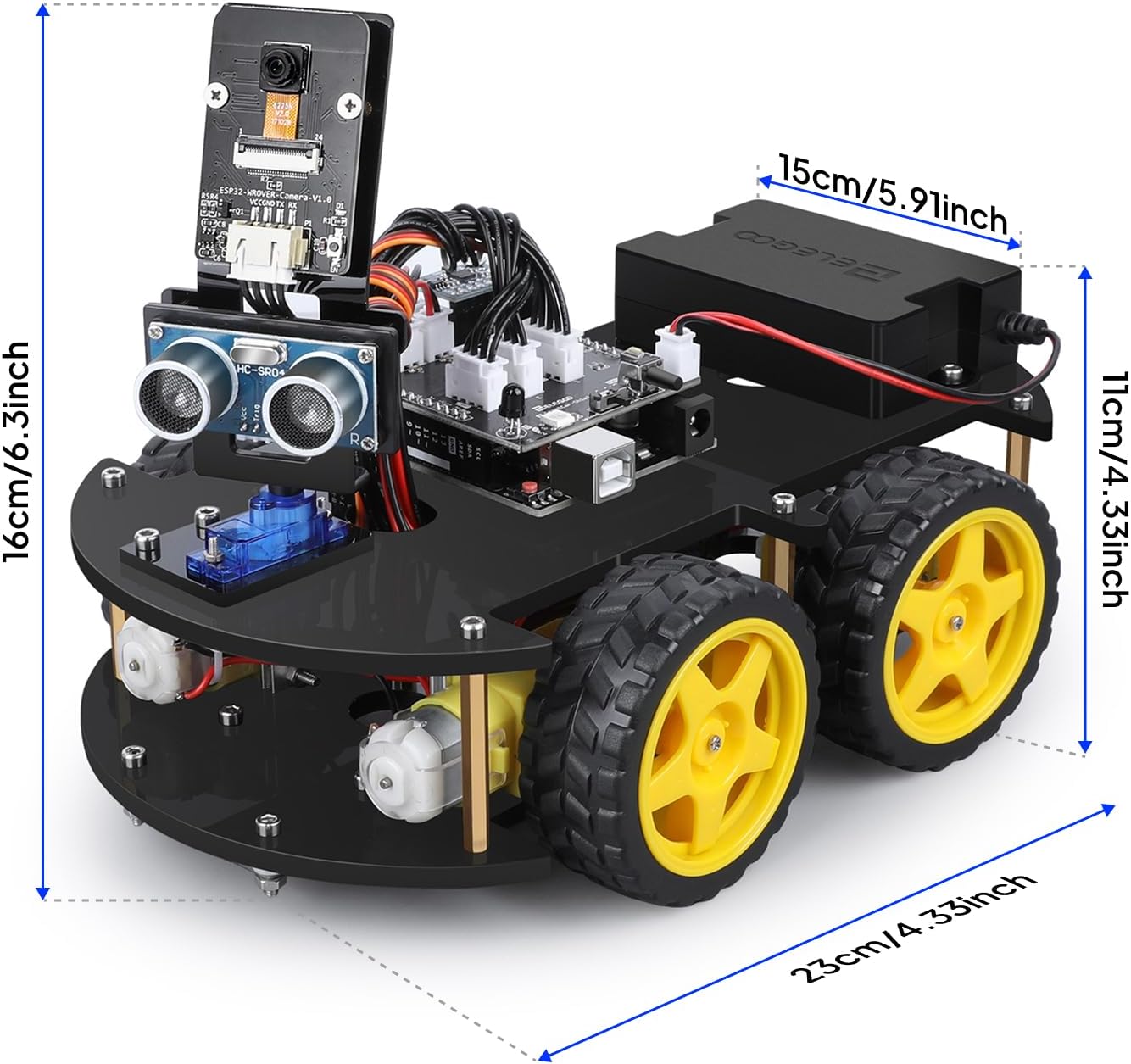
If you’ve ever searched “beginner robot kit” and landed on a page full of identical-looking wheeled cars with identical-sounding feature lists, you already know the problem: the specs are nearly useless for making a real decision. An Arduino robot car kit is, at its core, a small wheeled vehicle whose movement is controlled by an Arduino microcontroller — essentially a tiny programmable computer — that you connect to sensors, motors, and a chassis yourself. The build process is the point. These kits teach circuitry, basic programming, and problem-solving in a way that a passive tutorial alone never quite does. But “beginner” on the box can mean anything from “a 9-year-old with patience” to “a teenager who can already debug code.” This article breaks down three of the most-purchased kits — the ELEGOO UNO R3 Smart Car V4, the OSOYOO Smart Car, and the Makeblock mBot — on the axes that actually matter: real build experience, coding prerequisites, ceiling for growth, and total cost including the stuff that isn’t in the box.
The Decision Frame Before You Compare Anything
Before diving into specs, get clear on this one question: Who is actually doing the building, and what happens the day after the car drives for the first time?
That question separates these kits more cleanly than any feature list. Educational robotics writers at Make: Magazine and contributors at Hackaday have both observed in their beginner-kit coverage that the first-drive moment is emotionally significant — kids light up, adults feel the same satisfaction — but the divergence happens immediately after. Some learners want to follow the next tutorial. Others want to tear the code apart and make the car do something it wasn’t supposed to do. That second impulse — what we’d call the modification impulse — is one of the most reliable signals of genuine engagement, and the three kits handle it very differently.
Here’s a quick orientation before we go deep:
| Kit | Min. solo age | Soldering? | Coding prereq? | Modification ceiling |
|---|---|---|---|---|
| ELEGOO UNO R3 Smart Car V4 | ~10–11, guided | No | None | High |
| ELEGOO Conqueror Tank | ~10–12 | No | None (RC first) | Medium-High |
| OSOYOO Smart Car | ~13–14 | No | Helpful | Very High |
| Makeblock mBot | ~7–8 | No | None | Medium |
Kit-by-Kit Breakdown
ELEGOO UNO R3 Smart Car V4: The Reliable Entry Point
The ELEGOO Smart Car V4 is the kit that keeps showing up in “my kid actually finished it” reviews, and that’s not a small thing. The pattern is consistent across aggregated buyer reports: a 9-year-old assembles the V4 as a gift project and it works on the first try; a 13-year-old has the car running within a couple of hours and immediately starts asking how to change the code — the modification impulse, right on schedule.
Documentation quality. ELEGOO ships a printed tutorial booklet and maintains an online lesson library. The gap between “box opened” and “car moving” is reported by owners as roughly 2–3 hours for a guided adult-child build session. The lessons are sequential and the wiring diagrams are legible — a detail that sounds trivial until you’ve stared at a blurry schematic at 9pm.
No soldering. Every connection is plug-and-play with dupont wires and screw terminals. This removes an entire category of frustration for first-time builders.
The sensor suite is genuinely educational. The V4 ships with ultrasonic distance sensing, infrared line-following, and Bluetooth control. Each sensor corresponds to a lesson, which means the kit has a natural curriculum arc built in — you’re not just driving the car, you’re learning why each component exists.
Customer support. ELEGOO earns specific praise in buyer reviews for responsive email support when people hit problems. For a kit that may arrive with an ambiguous wiring step, knowing a human will respond within a day matters.
The honest ceiling: The V4 is excellent up through the included curriculum. The modification pathway exists — it’s an Arduino under the hood — but ELEGOO’s own documentation doesn’t actively guide you toward advanced projects. The 13-year-old who wants to add a camera or rewrite the line-following algorithm will need to pull from community resources outside the box.
OSOYOO
$49.99
In stock on Amazon
Check price on AmazonELEGOO Conqueror Tank: Lower Frustration Barrier, Different Learning Shape
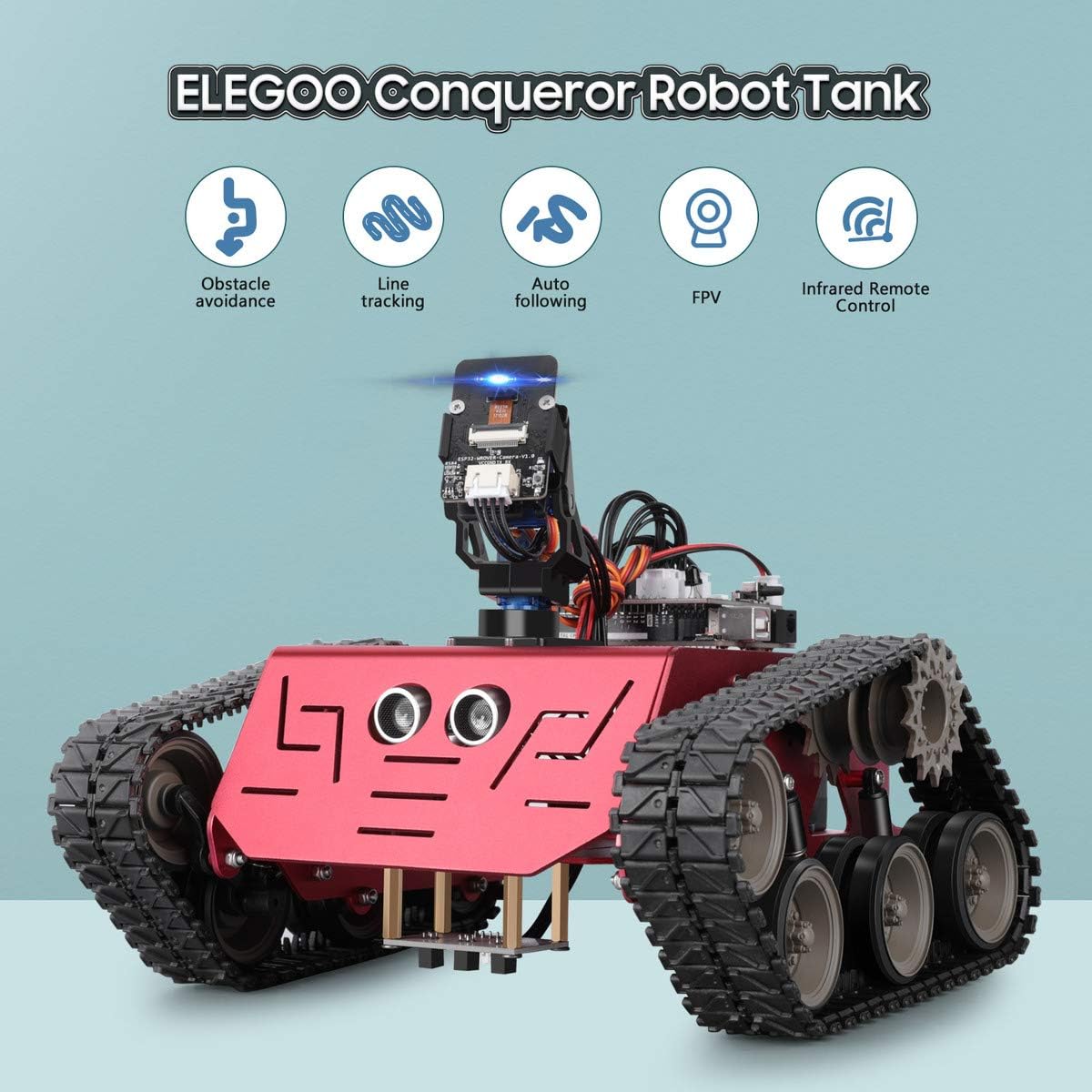
The Conqueror Tank earns a place in this comparison because it solves a specific problem: the gap between “box arrives” and “something exciting happens” is nearly zero. The tank ships ready to operate as an RC vehicle before you write a single line of code. It also includes FPV (first-person view) — a small camera whose video feed you can watch on your phone or a browser while driving.
This matters for two audiences. First, younger kids or impatient ones who need a win fast before coding motivation kicks in. Second, buyers who are genuinely unsure whether the recipient will want to code at all — if coding never happens, you still have a functional RC vehicle with a live camera, which has its own inherent value.
The trade-off: Because the RC functionality is so capable out of the box, some owners report the child never moves on to the programming lessons. The kit creates a comfortable stopping point early. If the goal is learning to code, the standard Smart Car V4 actually creates better forward pressure because the genuinely impressive behavior — autonomous obstacle avoidance — requires writing the code yourself.
Who this is for: A buyer who wants to de-risk the “what if they lose interest” scenario while still leaving a programming pathway open.
Makeblock
$69.99
In stock on Amazon
Check price on AmazonOSOYOO Smart Car: Best Kit for Teens Who Can Already Debug
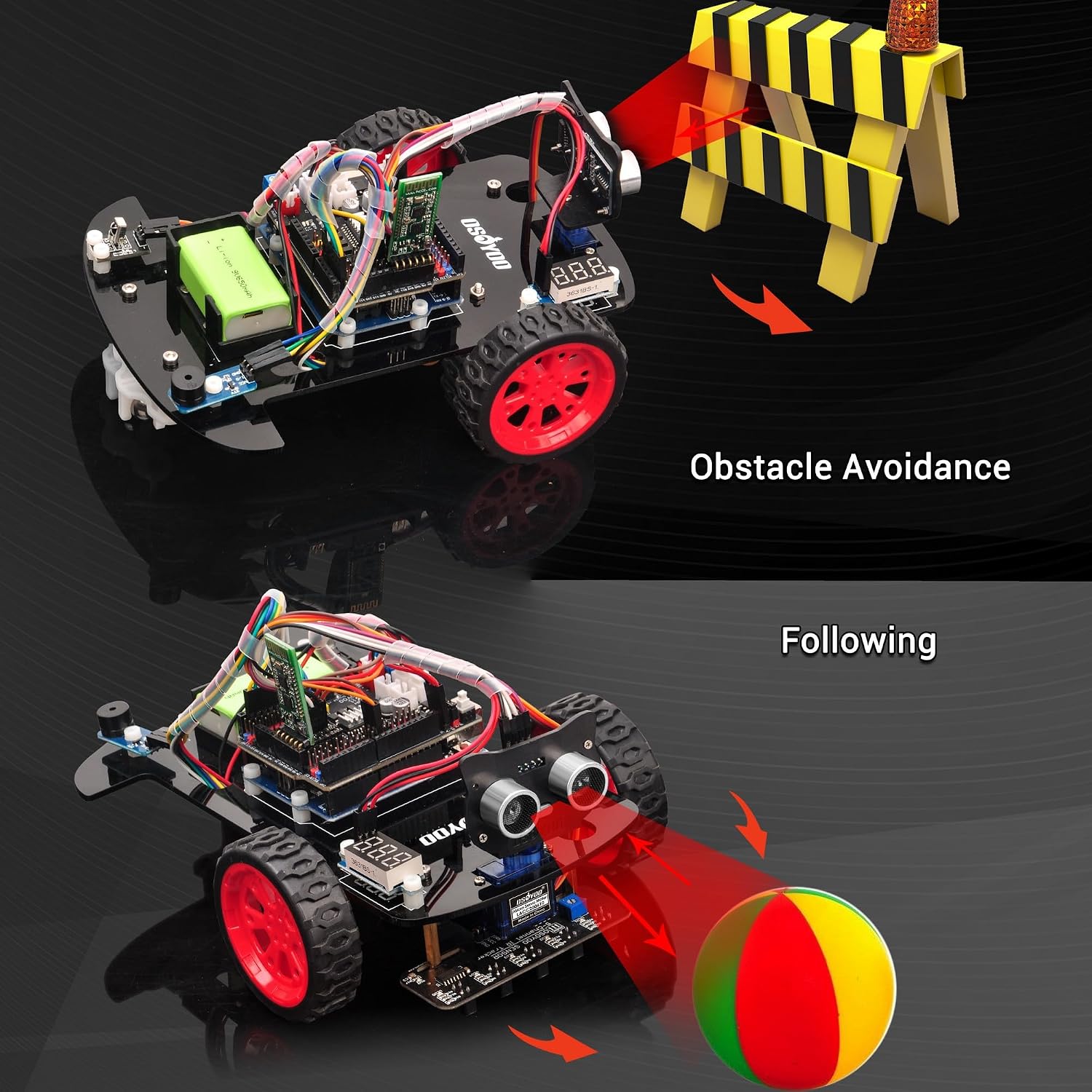
OSOYOO’s Smart Car is technically comparable to ELEGOO’s on paper: Arduino-based, similar sensor suite, no soldering. In practice the experience is meaningfully different.
The core issue: the OSOYOO kit assumes you’re comfortable with code, or at least comfortable getting comfortable through trial and error. Community discussions documented in Hackaday’s forums and project write-ups note that some lesson pin assignments in the printed guide don’t always match the corresponding video tutorials. For a confident teen who treats discrepancies as a debugging puzzle, this is manageable and arguably valuable. For a 10-year-old following along alone, it’s a show-stopper that requires an adult to resolve.
What OSOYOO does better than ELEGOO: depth of the coding curriculum. The OSOYOO lessons go further into sensor integration and motor control logic. Owners who push through the initial friction report a more thorough understanding of how hardware and software interact. IEEE Spectrum, in its “Learning Robotics at Home” feature, notes that kits requiring active debugging tend to produce deeper learning outcomes. The frustration is, counterintuitively, part of the value.
Customer support: Like ELEGOO, OSOYOO earns praise for responsive support. This is genuinely important here because the documentation creates more moments where you’ll need it.
By the numbers — OSOYOO vs. ELEGOO for a coding-naive 12-year-old:
- Average time to first successful autonomous drive (ELEGOO V4): ~2–3 hours
- Average time to first successful autonomous drive (OSOYOO, with documentation discrepancies): ~4–6 hours, with at least one debugging session
- Both kits: $0 additional spend required if you already own a laptop and USB cable
The decision rule: If your teenager has already done some Python or Scratch and expresses frustration tolerance when things break, OSOYOO rewards them. If they haven’t, start with ELEGOO and graduate.
Makeblock
$69.99
In stock on Amazon
Check price on AmazonMakeblock mBot: Widest Age Range, Real Ceiling
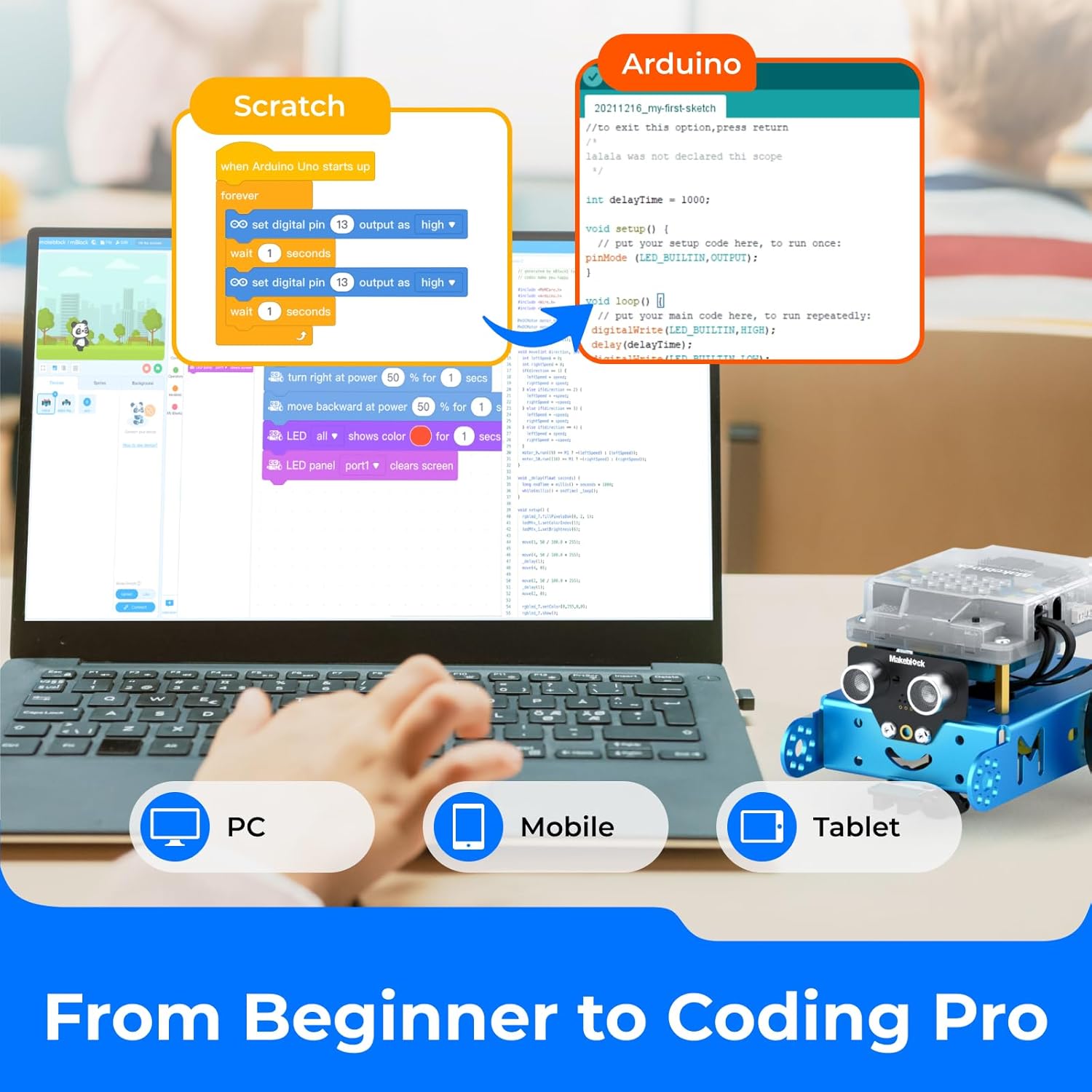
The Makeblock mBot occupies a different market position than the other two. It’s specifically designed for young learners — Make: Magazine’s educational robotics coverage has highlighted the mBot for structured classroom use, noting successful deployment across a wide age range including children under eight with adult guidance.
The mBot runs on mBlock software, which supports Scratch-style block coding (drag and drop, no syntax errors possible) and also supports Arduino C for more advanced users. That dual-mode approach is smart design — the kit grows with the learner in theory.
The ceiling problem: In practice, the built-in project library runs out faster than you’d expect for any child who’s genuinely engaged. Parents and educators consistently report that after completing the included projects, they’re left inventing new challenges from scratch. The mBot community and mBlock library help, but the burden falls on the adult. For a classroom or camp setting with a structured curriculum, this is manageable. For a parent who bought the kit hoping it would occupy a motivated 10-year-old independently, it gets exhausting.
On Python: mBlock’s software includes a Python mode, but hardware integration with the mBot’s onboard sensors is less thoroughly documented in Python than in Scratch or Arduino C as of 2026. It’s possible, but expect to supplement with community resources rather than relying on official tutorials.
The honest positioning: The mBot is the best kit in this group for a child under 10 with an engaged adult nearby, or for a structured classroom program. It is not the best choice if a 12-year-old will be working independently after the first hour.
ELEGOO
$129.99
In stock on Amazon
Check price on AmazonWhat Isn’t in the Box (Read This Before You Buy)
Across all three kits, buyers consistently report surprise at a few omissions. The Robot Report, in its “Educational Robotics Market Overview,” identifies underestimating hidden costs as one of the most common sources of buyer frustration in the beginner kit segment:
- AA or 18650 batteries. Most kits require 4–6 AA batteries or 18650 lithium cells. Not included. Budget $10–15 for batteries, or more if you want rechargeables with a charger.
- A laptop or computer. All three kits require a computer for programming. No tablet-only path exists for OSOYOO or ELEGOO’s full curriculum. The mBot’s Scratch mode works on tablets, but Arduino C does not.
- A USB programming cable. Type varies by kit. Often included, but confirm before assuming.
- Time. The first build session is rarely 45 minutes. Budget a full afternoon — 3–4 hours — for the first assembly and initial coding walkthrough.
Frequently Asked Questions
What age is the ELEGOO UNO R3 Smart Car actually appropriate for without parental help? Based on owner reports, 11–12 is the realistic floor for fully independent assembly and basic coding. A motivated 10-year-old can do it but will likely need an adult for at least one wiring or code troubleshooting moment.
Do any of these kits require soldering? No. All three — ELEGOO Smart Car V4, OSOYOO Smart Car, and Makeblock mBot — are no-solder kits. Connections use pin headers, screw terminals, or proprietary connectors depending on the component.
Can the Makeblock mBot be programmed in Python? mBlock’s software does include a Python mode, but Python support for the mBot’s onboard hardware is less comprehensively documented than Scratch or Arduino C as of 2026. It’s possible, but expect to rely on community resources rather than official tutorials.
What do I need to buy separately? At minimum: batteries (AA or 18650 depending on kit — check specs before buying) and a computer. Some kits omit the USB programming cable — verify before assuming it’s included.
How long does a typical first build session take? Plan for 2–3 hours for the ELEGOO V4 with an engaged adult-child team. The OSOYOO kit typically runs 4–6 hours for a first successful autonomous run when documentation discrepancies require debugging. The mBot is faster — owners report 60–90 minutes to first movement in Scratch mode.
The Decision Rule
If you’re buying for a child under 10 with structured adult involvement, or for a classroom: mBot.
If you’re buying for a child 10–13 who wants to build and code with moderate adult check-ins: ELEGOO UNO R3 Smart Car V4. It’s the safest first kit based on the breadth of positive owner reports and consistently strong documentation.
If the recipient needs a quick win before any coding motivation will stick: ELEGOO Conqueror Tank — RC vehicle first, coding curriculum second.
If you have a teen 13+ who already codes a little and treats broken tutorials as a puzzle rather than a dealbreaker: OSOYOO Smart Car. The friction is real, the depth is real, and the payoff is real.
All four are no-solder, sub-$100 entry points to a skill set — embedded programming, sensor integration, basic mechanical assembly — that scales all the way to the cobot arm decisions we cover elsewhere on this site. The intuition you build here is the same intuition that saves you from expensive mistakes later.